I use:

Saturday, May 14, 2011

The BlackBerry PlayBook

It certainly is here, and while it's just a toddler and an a little new to its environment, there's a wisdom in the design and the functionality that has me attached and thoroughly behind the product.

First, let me state, I was given this PlayBook by BlackBerry. I won it thanks to a twitter contest that gave me an option to attend the introduction party in Washington, D.C. and while I was unable to attend, they delivered this unit to me and asked for a review. I am going to give you an honest review.

Further disclaimers, I'm a proud Canadian, and as such have an affinity and interest in the success of RIM and the BlackBerry products, I spent some time in this device's home towns, and I can't help flying the red and while banner when I look this thing over. I'm proud of the effort and the result, as a version 1.0 tablet from a company that's made some fairly tough Smart Phones. Well, BlackBerrys were always just a little different than Smart Phones.

The first impression, though I'll spare you the unboxing pics, is that of a solid device, a comfortable heaviness in the hand, and a solidity that doesn't leave you feeling like you'l break it. The unit turns on right out of the box and while the microUSB charger, pouch and cleaning cloth are helpful, they're a distraction from the device. Locating the power button, a tiny thing that's easy to use, but definitely designed to prevent accident use, on the top edge of the unit beside the volume up, down, and play/pause buttons. It takes a moment to boot up from off, coming to life and getting it's bearings. It needs WiFi to get set up so make sure you have access to signal before starting. It takes you through a brief introduction, some preliminary steps and the first OS update. Expect a few of those over the next few months, as this thing gains the feedback and tweaks the ripples out of the BlackBerry tablet OS fabric. before you meet the OS itself there's a navigational tutorial that ensures you're not lost once it gets to the interface, and you're introduced the BlackBerryID because you need one to make this work. You'll use your own or create one at this time.

You're ready. The interface is simple you have five categories or buckets that contain your apps or sub-sets thereof: All, Favorites, Media, Games, BlackBerry Bridge. I spend most of my time in All, though I've started organising these better and wishing I could have defined my own buckets. You can move the apps around as you see fit and this is initiates with the touch and hold gesture. You put your finger on an app, then leave it there until they start pulsating, then they can be moved within their group, into another bucket, or deleted. The navigation of this interface (as you will have seen in the tutorial) is simple and staring an app is just a finger-tap away, it's comfortably sensitive in this respect. You can also get to the omnipresent settings menu by swiping down from the frame to the screen from the top-left corner this proves useful when needing to connect to WiFi, check the time, battery levels, and get access to settings.

The interface is simple, logical, and convenient, in fact the only miss-steps of the navigation are the odd time the device seems to decide it doesn't want to run an app, yet closing down another app will change it's mind and you're all set, or an inconsistency in the navigational quality when running an app you've found on Blackberry App World. yes, there are quite a few apps, both paid and free, and navigating these is easy.  Selecting All/Paid/Free simplifies the hunt, and the ratings are a good measure of quaility. There have been some very bright developers striving for an early position in this market. To them, well done. Personally, stick with the apps rated 3 or higher, unless you find an un-rated one in which case you're the pioneer. If you like it, go back and rate it, good developers need encouragement.

Getting on typical WiFi, what most people have at home or in travelling, easy. Getting it to work with a reasonably secure corporate network, works well too, which is better than my first experience with an iPad some months ago.

This device is ready for business... and leisure.
The BlackBerry Bridge software could be called tethering lite, but don't tell AT&T because they're very protective of their tethering data plans and we don't want them to throw a fit. I was able to download the BlackBerry Bridge software to me BlackBerry Torch (9800) and my life just got better by an order of magnitude. While the Torch has a wonderful screen and interface of it's own, the integration of the PlayBook's apps serve to make e-mail, BBM, and even file attachments usable, truly usable. When a message comes in on your BlackBerry you get notified on the PlayBook, you can access it from wherever you are through that top-left corner swipe and you're there. You can open a spreadsheet, presentation, word document and use the on-screen keyboard (which is easily hidden if you'd prefer) to make changes. I'd actually started this review on my PlayBook in Word-to-Go, part of Documents-to-Go, while riding the bus to work and it was quite easy to type, I really like the responsiveness of the keyboard!

Full tethering, providing your carrier is not as frustrating as AT&T, is easy to configure, but watch your data usage. I hate surprise phone bills. With Rogers (Canada) it was easily configured and worked well. I then turned it back off... again, surprises are unwelcome.

I run off wireless at home and at work, in fact the BlackBerry Bridge software migrated all the connections I'd configured on my Torch to the PlayBook with no re-entering of these settings aside from my Enterprise configuration which was easily added. The wireless is snappy and reliable, well - if your router is. I'll be buying a new router soon I suspect.

Pushing the "envelope" of functionality. I have tried the following browser-based tools on the PlayBook and while they are seem to work:

  • LotusLive (though opening a mail is a challenge as they use double-click)
  • Genesys Conferencing (screen sharing over-the-web presentation)
  • GMail
  • Google Docs (you need to set it to desktop mode as it thinks it's mobile.)
  • Mercury IT Governance (and I.T. tool for work)
  • Picasa
  • Tungle
  • FaceBook
  • YouTube
And they all work well. LotusLive.com's mail issue was resolved using the keyboard to "press" Enter, but everything was a great experience. 

Videos play well and the videos I transferred that were XviD, MOV, or WMV worked well, some didn't and while the BlackBerry Desktop Software is happy to convert the files, it's all or nothing and when it does it, it's not necessarily as well synced. I need to play more with this and may post a follow up.

Pictures are easily transferred too, it's a simple selection process and then a "sync", as is music. Because the PlayBook is also recognised as a drive when connected (as long as you install BlackBerry Desktop Software first). You may want to look into the Wireless Connectivity but, please, set a password. I'll be playing with this more soon and do a follow-up.

What I did for my pictures was I used Picasa and created albums for the pictures I wanted to move to the device. I intentionally cropped the photos, where possible, to 16:9 and exported them directly to the PlayBook file structure, the cropping and folders created have given me the best possible experience for showcasing this device's beautiful screen. The Picture app that's included does a reasonable job at photo review and has great navigation but when applied as a picture frame lacks looping and timing adjustments. It is definitely not a photo-frame app, it's a picture viewer. This leaves room for the photo-frame apps in the BlackBerry App World, which is where it should be.

The sound quality is great on this device, and video playback is perfect. I popped in xXx, Planet Earth, and the Pilot of Dead Like Me as examples and my 16Gb device is still very happy. I don't download, I do rip, using DVD Ripper from Xilisoft (xilisoft.com) and it works best for this purpose, these same files look awesome on my PS3, PC, and XBOX360. This is now surprise that the BlackBerry PlayBook is delivery awesome, portable media.

The Cameras, yes, there are two.
I haven't play much with these as yet, but the and stills I have taken have been top-notch quality. The cameras are 5 mega-pixel (rear) and 3 mega-pixel (front), which is reasonable in this type of device.


Kobo, the eBook reader.
It's what it should be a good quality eBook reader that I can buy books for and even buy them without a credit card (in Canada too) buy buying Chapters/Indigo gift Cards. It's included, has a good interface and page-turning feel to the navigation. You can preview books (portions of them) and they are delivered to the device. I don't know what happened to Amazon.com's intent to offer a Kindle Reader, but I'd love to see my investment in Kindle Books ($0 in all fairness, though I do have the latest Kindle 3G eReader. I'll review readers later too.

How does this compare to the Apple iPad/iPad2? It's smaller, but that's not all bad. Unlike Steven Jobs, I do like the 7" form-factor. Price-wise it's very similar ($14 less than the iPad) and it does what I need better than the iPad (Flash, enterprise networking). If you are running data through your BlackBerry, you get to take advantage of the data compression and security of the BlackBerry's network design and you get BBM.

I have yet to try the HDMI out, but now that I'm certain I like the device I can budget for the Desktop Rapid Charger, miniHDMI to HDMI cable, and the case. I have ~3Gb left on this device, and once I start playing more with video and the camera I suspect I may need to upgrade to the 32Gb or 64Gb, $599 and $699 respectively. The 16Gb, $499, would go to a very lucky daughter when I get her a BlackBerry to Bridge to.

Overall, a good device, for business or personal use. It's solid, has the right features, and comes with Tetris. It also comes with Need for Speed Underground, but this was my serious review. It's the best tablet I've used and I'm happy to have it. If 16Gb is not enough, I'll by a bigger BlackBerry PlayBook, not an iPad or Android, and this is because I honestly feel it's the best device for me.

Un-boxing photos:
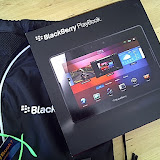
BlackBerry PlayBook

Wednesday, April 06, 2011

"The Archos 32" or "Why Buy an iPod Touch."

I bought this device for my daughter as an alternative to the more expensive ($249) iPod Touch (8Gb).

Never have I seen one product argue that another product is a better choice than this device. The Archos 3.2 is a $160(+tax) Android device that is not only poorly thought out, but doesn't do what's advertised without a constant fight. If you're not a technical user, and want a personal/portable media device, this device is not for you. In fact, if this device is any indication I'd avoid Archos, and potentially other Android devices, based on this experience alone.

First things first. WiFi does not work reliably on this device, when it's fortunate enough to connect, don't expect much because it can barely handle sourcing music from my Media PC, let alone act as anything more than a clock on it's own.

It doesn't have a speaker, yet they felt in necessary to feature an alarm clock. I bought speakers, they sound great. but what does the device really offer?

The video playback was great, on a 3.2 inch screen, but the player supports a limited number of codecs (transcoders so you can watch movies/videos). As it has trouble dealing with wireless the files had better be local and as there's no additional memory (8Gb max.) you're limited.

The features list for this (and other) Archos devices labelled as "Internet Tablets" suggests that you can connect external media (USB drives), but there's no cable included and no easy means by which to obtain one. I do not consider their web site to be an easy or practical means, and last I looked, it wasn't available.

The Video camera, well camera in general is fairly weak. not only is it at the wrong end of the device, it's not terribly capable. I wasn't impressed at all.

I looked for a single salvation of this device, the ability to play Angry Birds, which is free from the AppsLib.com (like and App Store), but no, the tracking on this tiny screen is so poor you're frustrated and quickly contemplate turning this device into a projectile.

In short, the features, forethought, and quality of this device are an excellent recommendation for the iPod Touch. The iPod Touch... works well, in every way. Consistently.

When asked by a co-worker whether I'd sell him my tested Archos 3.2, I said no. I said go buy a device you'll be happy with. He did, a 64Gb iPod Touch. He is happy.

My Archos 3.2, well I was hoping to use it as a developer device for Android, but rather than frustrate myself. I think I'll drop it into one of my boxes of old hardware to be rediscovered in a decade, then thrown out.

Friday, December 31, 2010

In the Console Wars: XBOX vs. PS3 vs. Wii, what's the best choice?

I've been a Microsoft fan-boy since before I spent a few years working for them. They, generally, have a quality product, and aside from Windows Me, Windows Vista, and Word 6.0 for Macintosh (which is much like Windows Vista's growing pain), they've had a quality offering to the consumer. The same can be said for their game console, it's a quality piece of hardware... Now. It had a rough start with version 1 (circa 2001), and the XBOX360 was cursed by hardware issues and only saved by Microsoft's extension of the warranty to 3 years for the "Red Ring of Death" and the E74 errors. I had two XBOX360's get replaced due to failure, but still the platform is awesome.

Now, I was given a PlayStation 3 for Christmas. I'm not new to Sony's offerings, having had and since given away a PS2 years ago, another fine system that remains available and is, in fact, being integrated into some flat-panel displays even now. The news to me is how much less the TCO is for the PlayStation3 compared to the XBOX360 as it stands right now.

Right out of the box the PS3 has a choice of wired or wireless connectivity to the Internet (your router) and it's a Blu-Ray DVD player. It can connect to your home PC that has all of your [legally obtained] MP3s, DivX movies, and Pictures as shared by Media Player (version 10+/Windows XP and later). You have an ample hard disk (250Gb at this point, though my PS3 is older and has an 80Gb), and all of this is out of the box!

Now the XBOX360 is very similar. The current (as of 2010) model has all of the above with the exception of that Blu-Ray player, but this is not the TOTAL COST of OWNERSHIP... To get online and play against others on the XBOX you need an XBOX Live Gold membership, $60. To attach a camera to the XBOX, you need their XBOX branded camera (~$50) or the new and very cool XBOX Kinect Controller ($150). To get a wireless headset for the XBOX, that's $60. The list goes on...

I am very pleased to see that the following is true of the PlayStation 3.

While the Blue-Ray drive is proprietary and somewhat difficult to source/replace for the technically inept, upgrading the hard drive is... non-proprietary and you can upgrade at your discretion. The camera, if you like such things, can be the same web-cam as you use on your PC. and your headset can be a Bluetooth or USB-connected, and these are not specialized. Also, you get the advantage of a real web browser on the PS3, something the XBOX has needed for a very long time. Oh, and getting online to play others... is FREE. No membership fees. Another easily overlooked advantage to the PS3, the controllers are rechargeable wireless, the batteries may be internal, but you can charge via USB while playing. It's true the XBOX controllers can do this, but you pay a premium for the controller then need to supply your own batteries or get a battery pack.

The choice of games systems is tilted in favour or the PS3, the final influence is the games you want to play. There are Microsoft-only properties, and Sony-only properties. You can't play any of the Halo or Forza games on the PS3, but you can't get GT5 on the XBOX360...

Oh, I didn't mention the Wii... I did say BEST choice. Personally I use the Wii for Netflix, but it's a good low-cost system that has fun games for kids.

Thursday, October 21, 2010

Apple (Canada) - MacBook Air - The next generation of MacBooks.

Apple (Canada) - MacBook Air - The next generation of MacBooks.

This is a problem. The Mac product line has been enhanced with the addition of the Macbook Air. The 11 and 13-inch wonders from Apple have me in a position of great conflict. On the one had this is a Macintosh, and Apple product, that is a remarkable work of technical art. They've produced technical art for years and are quite good at it. On the other hand it's an Apple and while I'm wondering about the sanity of the great Steve Jobs, especially after that most recent earnings call, the company's over-priced approach to proprietary technology, their technical arrogance, has bothered me for years.

The bottom line is that my conflict has been, for years, that Apple doesn't work and play well with others and while their products are nearly bulletproof from an operational stand-point, they remain closed-minded. Shamefully, I have recognized for some time that the benefits of closed-mindedness is that the system is incredibly stable and when it becomes unstable the responsibility falls squarely on Apple's shoulders. The thing is, they have taken on this responsibility quite well. My only argument against Apple, now, is the price... okay, was.

The new Macbook Air, and indeed the existing and wonderful Mac Mini, are examples of affordable personal computing awesomeness. A laptop that's stable, virtually un-threatened by viruses, and has Mac reliability for about $1000 is a good choice.

Now, don't get me wrong, I still feel that there is evidence that some of the Mac Users are delusional and they've set up in Apple's camp from a strictly non-technical standpoint. I also feel that if you need an economical PC that looking to a Windows-based system is going to cost you less, but I must stop myself from being Anti-Apple and admit to you, and everyone else that these new products, in fact many of their products right now, are amazing devices.

The iPhone, iPad, iPod Touch and Nano, the Mac Mini, and the new Macbook Air products offer a wonderful experience for the user, the consumer and as creativity tools. The use of any Apple product in an enterprise, for business, is another matter. For business, the reality remains that the BlackBerry and the Windows-based PC is the right choice, but that's another story.

A tribute to the durability of at least ONE Apple product:

Friday, April 16, 2010

Pogoplug: NAS Improvisation with a Social Media Twist

On April 15th, 2010, pay day, I picked up a necessary new tool in data security, the Pogoplug. It is not a Network Attached Hard Disk, but a facilitator to helping your various USB 2.0 Storage Mediums become Network Attached Storage.

The first thing you will notice is the colour, it's hot pink! That aside, and real men can put that aside, it's a well-designed device with an Ethernet jack (RJ-45), 4 USB ports (1 on the front), and a very secure power-plug. They advertise a 60-second setup, they're not wrong though I'm unsure of the need for some of the Social Network nuances (connectivity to your Twitter, MySpace, and Facebook accounts for updates). The next thing, if you have an iPod, PS3, or XBOX360, is that whatever media you connect to this sweet little device becomes available to stream to these remote media devices. It was quickly recognised by my XBOX360 allowing me to, finally, excuse my primary PC from this menial task. The poor little box also transcodes video so that it's compatible for other devices, though I'm not certain this would help your XBOX play your iTunes collection, we'll see.

Security is provided through their website, https://my.pogoplug.com, and you will want to ensure this password is secure, you can potentially access all of the connected physical media from any web-connected PC in the world. While it has the ability to share other folders, be careful about this and please do NOT post copyright protected materials for everyone and their brother.

I'm going to explore this device more over the next few weeks, but I'm starting of the stress-test of backing up all of my backups. I connected a very nice 1Tb hard disk I picked up at TigerDirect.ca for $90 (a good deal) and a 16Gb USB Key that I recently acquired from Staples. The Windows software provided (via download) allowed the Pogoplug to appear as a physical drive, the connected devices are presented as folders based on their hardware identity (i.e. SanDisk Cruzer, SAMSUNG DF1H32), though you can rename these through the web interface. You can also grant access to the device through SSH, that I'll explore later too.

Stats (As I find them):
Copying from a network resource to the Pogoplug, same network: 88.133 MegaBytes/min
(Robocopy of 28Gb over 5:35h)

Friday, February 19, 2010

KODAK ESP 5250 All-in-One Printer Support

We all hate paying an arm and a leg for printer ink, so when Kodak brought out their reasonably printers with even more reasonably priced ink cartridges I was eager to retire my printer and enjoy the savings. The problem is the sacrifice. Poor quality print due to faulty a print head.

For help I went to the KODAK ESP 5250 All-in-One Printer Support web site, it offered online chat with technical support and they happily listened and responded in broken english (text) as we tried to resolve the issue. They came to the conclusion the print head was indeed faulty and opted to send me a replacement, the 5-7 day wait was over in just 2 or 3. I installed the new print head to a diminished, but continuing problem. How much patience should I have?

Year ago I told Kodak, and myself, that I would never buy another Kodak product, but I gave in for this new and wonderful technology. Big mistake!

So, I'm on the second chat with technical support now. "The printer will need to be replaced."

Wow, replace the printer? How does Kodak make money on this product?

I'm waiting for DHL to deliver my new printer... I'm not impressed so far. Kodak? If this printer doesn't work, you owe me $200. I'll let the 58 cents slide. If the new printer is fine, I'll make sure it's noted here but for now, don't follow my lead, buy something else (Lexmark or Canon perhaps).

UPDATE: 2010.02.25...
Aside from the absolutely STUPID service from DHL in delivering the replacement printer, the replacement printer is complaining that I need to replace my NEW (included with the printer) colour ink cartridge. Calling Kodak tech support...

Resolved. I replaced the ink cartridges with the two spares I bought with the printer, though I was unimpressed with their longevity of ink* so far.

Now, I'll keep you posted on how this printer is as time goes by, but I'll caution you, don't open the cover too often, apparently the print head cleaning process drinks ink like it's coffee! Because of the constant opening and closing of the printer as we tried to resolve the issue, we finished a pair of cartridges. Kodak Technical Support is replacing them, by courier, yes, DHL.

I still need to ship back the bad printer's carcass, yes, through DHL. I hope this is painless.

Where's my packing tape?

UPDATE: 2010.03.09...
There's a problem with using DHL. They're not open until after I'm at work and there's no one home to meet them, generally, should they want to pick up the package. Kodak, you're gonna need to be patient while I figure this out, the printer's packed and ready, but I need to figure out how to co-ordinate with DHL.

UPDATE: 2010.03.12...
It seems DHL can't pick up after 3pm on a weekday, and since I don't have a car, there no way I'm lugging this to DHL's Depot. So, Kodak, how are you going to get your printer back? It's YOUR printer, It's not going to be MY hassle. Good luck.

UPDATE: 2011.08.30...
It seems this is how long a print head lasts, about 18 months. The replacement cost is ~$26, and if you get new ink cartridges with the printer it's ~$46. That said, the printer has not been impressive enough in these 18 months that I feel compelled to save it. For one, I can't buy a print head for the printer in the retail channels, I'd need to buy on-line, via support. As it stands I can go to BestBuy and buy a new printer from HP for $60-70. It's a waste in so many ways, the scanner portion of this printer works well. The Card reader was a waste of space and it's purpose became moot with a $20 USB-based card reader from Kingston. The printer was NEVER great, and the number of ink cartridges I've gone through has never match the suggested page counts, even if they cost 1/2-1/3 of the cost of the HP print heads, you might be better off if you like reliable quality. My neighbour has a Brother MFC-290C he's happy with, I've heard great things about Brother. I have a Pogoplug device (pogoplug.com) which has e-mail functionality compatible with Epson and HP, so they are considerations so I can print remotely (via e-mail). Oh, Kodak offered me 25% off a printer bought on-line at their store, I ask them this, "If I have been unimpressed with the first Kodak printer and the ensuing support of that printer, why would I buy another Kodak printer, even at 25% off?" Notably, 25% off their printer is still more than the HP from BestBuy.