Apple (Canada) - MacBook Air - The next generation of MacBooks.
This is a problem. The Mac product line has been enhanced with the addition of the Macbook Air. The 11 and 13-inch wonders from Apple have me in a position of great conflict. On the one had this is a Macintosh, and Apple product, that is a remarkable work of technical art. They've produced technical art for years and are quite good at it. On the other hand it's an Apple and while I'm wondering about the sanity of the great Steve Jobs, especially after that most recent earnings call, the company's over-priced approach to proprietary technology, their technical arrogance, has bothered me for years.
The bottom line is that my conflict has been, for years, that Apple doesn't work and play well with others and while their products are nearly bulletproof from an operational stand-point, they remain closed-minded. Shamefully, I have recognized for some time that the benefits of closed-mindedness is that the system is incredibly stable and when it becomes unstable the responsibility falls squarely on Apple's shoulders. The thing is, they have taken on this responsibility quite well. My only argument against Apple, now, is the price... okay, was.
The new Macbook Air, and indeed the existing and wonderful Mac Mini, are examples of affordable personal computing awesomeness. A laptop that's stable, virtually un-threatened by viruses, and has Mac reliability for about $1000 is a good choice.
Now, don't get me wrong, I still feel that there is evidence that some of the Mac Users are delusional and they've set up in Apple's camp from a strictly non-technical standpoint. I also feel that if you need an economical PC that looking to a Windows-based system is going to cost you less, but I must stop myself from being Anti-Apple and admit to you, and everyone else that these new products, in fact many of their products right now, are amazing devices.
The iPhone, iPad, iPod Touch and Nano, the Mac Mini, and the new Macbook Air products offer a wonderful experience for the user, the consumer and as creativity tools. The use of any Apple product in an enterprise, for business, is another matter. For business, the reality remains that the BlackBerry and the Windows-based PC is the right choice, but that's another story.
A tribute to the durability of at least ONE Apple product:

I use:

Thursday, October 21, 2010


Monday, July 05, 2010
Friday, April 16, 2010
Pogoplug: NAS Improvisation with a Social Media Twist
 On April 15th, 2010, pay day, I picked up a necessary new tool in data security, the Pogoplug. It is not a Network Attached Hard Disk, but a facilitator to helping your various USB 2.0 Storage Mediums become Network Attached Storage.
The first thing you will notice is the colour, it's hot pink! That aside, and real men can put that aside, it's a well-designed device with an Ethernet jack (RJ-45), 4 USB ports (1 on the front), and a very secure power-plug. They advertise a 60-second setup, they're not wrong though I'm unsure of the need for some of the Social Network nuances (connectivity to your Twitter, MySpace, and Facebook accounts for updates). The next thing, if you have an iPod, PS3, or XBOX360, is that whatever media you connect to this sweet little device becomes available to stream to these remote media devices. It was quickly recognised by my XBOX360 allowing me to, finally, excuse my primary PC from this menial task. The poor little box also transcodes video so that it's compatible for other devices, though I'm not certain this would help your XBOX play your iTunes collection, we'll see.
Security is provided through their website, https://my.pogoplug.com, and you will want to ensure this password is secure, you can potentially access all of the connected physical media from any web-connected PC in the world. While it has the ability to share other folders, be careful about this and please do NOT post copyright protected materials for everyone and their brother.
I'm going to explore this device more over the next few weeks, but I'm starting of the stress-test of backing up all of my backups. I connected a very nice 1Tb hard disk I picked up at TigerDirect.ca for $90 (a good deal) and a 16Gb USB Key that I recently acquired from Staples. The Windows software provided (via download) allowed the Pogoplug to appear as a physical drive, the connected devices are presented as folders based on their hardware identity (i.e. SanDisk Cruzer, SAMSUNG DF1H32), though you can rename these through the web interface. You can also grant access to the device through SSH, that I'll explore later too.
Stats (As I find them):
Copying from a network resource to the Pogoplug, same network: 88.133 MegaBytes/min
(Robocopy of 28Gb over 5:35h)
Friday, February 19, 2010
KODAK ESP 5250 All-in-One Printer Support
We all hate paying an arm and a leg for printer ink, so when Kodak brought out their reasonably printers with even more reasonably priced ink cartridges I was eager to retire my printer and enjoy the savings. The problem is the sacrifice. Poor quality print due to faulty a print head.
For help I went to the KODAK ESP 5250 All-in-One Printer Support web site, it offered online chat with technical support and they happily listened and responded in broken english (text) as we tried to resolve the issue. They came to the conclusion the print head was indeed faulty and opted to send me a replacement, the 5-7 day wait was over in just 2 or 3. I installed the new print head to a diminished, but continuing problem. How much patience should I have?
Year ago I told Kodak, and myself, that I would never buy another Kodak product, but I gave in for this new and wonderful technology. Big mistake!
So, I'm on the second chat with technical support now. "The printer will need to be replaced."
Wow, replace the printer? How does Kodak make money on this product?
I'm waiting for DHL to deliver my new printer... I'm not impressed so far. Kodak? If this printer doesn't work, you owe me $200. I'll let the 58 cents slide. If the new printer is fine, I'll make sure it's noted here but for now, don't follow my lead, buy something else (Lexmark or Canon perhaps).
UPDATE: 2010.02.25...
Aside from the absolutely STUPID service from DHL in delivering the replacement printer, the replacement printer is complaining that I need to replace my NEW (included with the printer) colour ink cartridge. Calling Kodak tech support...
Resolved. I replaced the ink cartridges with the two spares I bought with the printer, though I was unimpressed with their longevity of ink* so far.
Now, I'll keep you posted on how this printer is as time goes by, but I'll caution you, don't open the cover too often, apparently the print head cleaning process drinks ink like it's coffee! Because of the constant opening and closing of the printer as we tried to resolve the issue, we finished a pair of cartridges. Kodak Technical Support is replacing them, by courier, yes, DHL.
I still need to ship back the bad printer's carcass, yes, through DHL. I hope this is painless.
Where's my packing tape?
UPDATE: 2010.03.09...
There's a problem with using DHL. They're not open until after I'm at work and there's no one home to meet them, generally, should they want to pick up the package. Kodak, you're gonna need to be patient while I figure this out, the printer's packed and ready, but I need to figure out how to co-ordinate with DHL.
UPDATE: 2010.03.12...
It seems DHL can't pick up after 3pm on a weekday, and since I don't have a car, there no way I'm lugging this to DHL's Depot. So, Kodak, how are you going to get your printer back? It's YOUR printer, It's not going to be MY hassle. Good luck.
UPDATE: 2011.08.30...
It seems this is how long a print head lasts, about 18 months. The replacement cost is ~$26, and if you get new ink cartridges with the printer it's ~$46. That said, the printer has not been impressive enough in these 18 months that I feel compelled to save it. For one, I can't buy a print head for the printer in the retail channels, I'd need to buy on-line, via support. As it stands I can go to BestBuy and buy a new printer from HP for $60-70. It's a waste in so many ways, the scanner portion of this printer works well. The Card reader was a waste of space and it's purpose became moot with a $20 USB-based card reader from Kingston. The printer was NEVER great, and the number of ink cartridges I've gone through has never match the suggested page counts, even if they cost 1/2-1/3 of the cost of the HP print heads, you might be better off if you like reliable quality. My neighbour has a Brother MFC-290C he's happy with, I've heard great things about Brother. I have a Pogoplug device (pogoplug.com) which has e-mail functionality compatible with Epson and HP, so they are considerations so I can print remotely (via e-mail). Oh, Kodak offered me 25% off a printer bought on-line at their store, I ask them this, "If I have been unimpressed with the first Kodak printer and the ensuing support of that printer, why would I buy another Kodak printer, even at 25% off?" Notably, 25% off their printer is still more than the HP from BestBuy.
UPDATE: 2010.02.25...
Aside from the absolutely STUPID service from DHL in delivering the replacement printer, the replacement printer is complaining that I need to replace my NEW (included with the printer) colour ink cartridge. Calling Kodak tech support...
Resolved. I replaced the ink cartridges with the two spares I bought with the printer, though I was unimpressed with their longevity of ink* so far.
Now, I'll keep you posted on how this printer is as time goes by, but I'll caution you, don't open the cover too often, apparently the print head cleaning process drinks ink like it's coffee! Because of the constant opening and closing of the printer as we tried to resolve the issue, we finished a pair of cartridges. Kodak Technical Support is replacing them, by courier, yes, DHL.
I still need to ship back the bad printer's carcass, yes, through DHL. I hope this is painless.
Where's my packing tape?
UPDATE: 2010.03.09...
There's a problem with using DHL. They're not open until after I'm at work and there's no one home to meet them, generally, should they want to pick up the package. Kodak, you're gonna need to be patient while I figure this out, the printer's packed and ready, but I need to figure out how to co-ordinate with DHL.
UPDATE: 2010.03.12...
It seems DHL can't pick up after 3pm on a weekday, and since I don't have a car, there no way I'm lugging this to DHL's Depot. So, Kodak, how are you going to get your printer back? It's YOUR printer, It's not going to be MY hassle. Good luck.
UPDATE: 2011.08.30...
It seems this is how long a print head lasts, about 18 months. The replacement cost is ~$26, and if you get new ink cartridges with the printer it's ~$46. That said, the printer has not been impressive enough in these 18 months that I feel compelled to save it. For one, I can't buy a print head for the printer in the retail channels, I'd need to buy on-line, via support. As it stands I can go to BestBuy and buy a new printer from HP for $60-70. It's a waste in so many ways, the scanner portion of this printer works well. The Card reader was a waste of space and it's purpose became moot with a $20 USB-based card reader from Kingston. The printer was NEVER great, and the number of ink cartridges I've gone through has never match the suggested page counts, even if they cost 1/2-1/3 of the cost of the HP print heads, you might be better off if you like reliable quality. My neighbour has a Brother MFC-290C he's happy with, I've heard great things about Brother. I have a Pogoplug device (pogoplug.com) which has e-mail functionality compatible with Epson and HP, so they are considerations so I can print remotely (via e-mail). Oh, Kodak offered me 25% off a printer bought on-line at their store, I ask them this, "If I have been unimpressed with the first Kodak printer and the ensuing support of that printer, why would I buy another Kodak printer, even at 25% off?" Notably, 25% off their printer is still more than the HP from BestBuy.
Friday, November 27, 2009
Evenings and Weekends...
While I don't like to book all my free time, if need be I'm available to help. Why only these times, well, I went and found myself a good job.
Regardless, please, if you're in need of help, please call.
Regardless, please, if you're in need of help, please call.
Sunday, April 12, 2009
For Hire: Tech Guy
It's tough to find a job for which there seems to be no definitive job description beyond, "Our technology guy." There's a closed and quiet market for the technical resource in a small-to-medium sized business, often the roll is inherited out of necessity as the company expands and has more requirements than the ISP can offer. Often these companies get cosy with a local supplier of PCs and they grow from there, but how do I get this role? and... Why do I want it?
It is often said that it is who you know not what you know that gets you the best opportunities. This is partially true, in that if you know someone well enough for them to offer you a job, you can expect that they have some idea of what you know before they make the offer. The question is how do you get to know the right person? That answer is coverage! You need to get out there and represent yourself, be active in your community and help people, though not necessarily for free. In fact if people are happy with your work at a fair market value, they will be more than happy to hire or refer you. I've been told that the best advertising for a small business is great customer service, though knowing what to charge and how to say no is important.
Why do I want a role as the 'tech guy' in a small business? Simply, the variety. I like a challenge and helping people, those two issues come together for small business quite often, being one or more small-business' technical resource would offer me the variety to make my day-to-day challenging and, frankly, fun. If business 'A' doesn't want teh expense of a full-time person, I'm happy with that, I live in Brampton, Ontario, near Steeles Ave. and Bramalea Road. This area is well connected for transit and I can certainly get around to more than one site in a day, it could even be worked into a once-a, twice-a, or every other week mixture. I'll handle the technology, you just tell me what you want and need, we'll work out the budget and I'll get things done.
If you're looking for this sort of help, I want to be your 'tech guy.'
It is often said that it is who you know not what you know that gets you the best opportunities. This is partially true, in that if you know someone well enough for them to offer you a job, you can expect that they have some idea of what you know before they make the offer. The question is how do you get to know the right person? That answer is coverage! You need to get out there and represent yourself, be active in your community and help people, though not necessarily for free. In fact if people are happy with your work at a fair market value, they will be more than happy to hire or refer you. I've been told that the best advertising for a small business is great customer service, though knowing what to charge and how to say no is important.
Why do I want a role as the 'tech guy' in a small business? Simply, the variety. I like a challenge and helping people, those two issues come together for small business quite often, being one or more small-business' technical resource would offer me the variety to make my day-to-day challenging and, frankly, fun. If business 'A' doesn't want teh expense of a full-time person, I'm happy with that, I live in Brampton, Ontario, near Steeles Ave. and Bramalea Road. This area is well connected for transit and I can certainly get around to more than one site in a day, it could even be worked into a once-a, twice-a, or every other week mixture. I'll handle the technology, you just tell me what you want and need, we'll work out the budget and I'll get things done.
If you're looking for this sort of help, I want to be your 'tech guy.'
Tuesday, March 17, 2009
Implementing Multilingual Keyboard Layouts
I am certain this is a source of frustration for many people, but I am witness to the chaos involved and the mystery surrounding the Language Bar in Windows XP and Windows Vista.
My sister-in-law finally surrendered to the necessity for a new laptop and my brother enlisted me to do what I seem to do best, help spend money. My sister-in-law (and brother for that matter) speak french and in both personal and business applications use french words that require accented characters. Fortunately most laptops available these days have a multilingual keyboard that can accommodate these characters, though the truth of the matter is you don't need a special keyboard to type résumé correctly. There is a wonderful keyboard definition which is called US-International (formerly US-Multilingual) that does a fine job. For those who learned on a truly language specific keyboard, there's a method and accompanying madness that allows you to use the special keys offered by the 'Alt Gr' or 'Alt Car' key (which is the right Alt key to most of us).
To help me try to explain this, because my sister-in-law is not here to tell me what she was really expecting for behaviour, I am employing the Microsoft Keyboard Layout Creator (MSKLC) to view and compare the different layouts. This tool is actually meant to allow anyone to create their own custom layout (ideally based on an existing keyboard but I might see how far I can take this later as to whether this would be valuable in doing custom POS or proprietary systems).
I am accustomed to the US-International configuration for utilizing accents and such, it's a simple and generic manner of generating the required effects because it doesn't change the key assignments from the standard keyboard, but enhances the keyboard through prefixing keystrokes. For example the é character is generated with a single quote (')+e in that order. a 'ç' is generated in the same manner ('+c). The umlatted characters are prefixed by the double-quote (") for ë, and the other prefix keys are the tilde (~), carat (^), and left-single quote (`) as used for ñ, â, and à. There are many more characters that are possible using that right Alt key, such as: ¡, €, ¥, ä, ®, ©, ñ, and ¿ (this is not a complete list, check here for the Microsoft Knowledge base article).
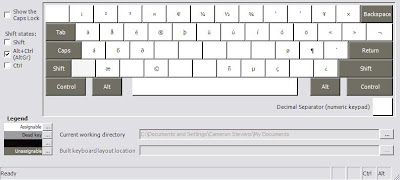
So, using this layout is great for the bulk of us, though we may have somewhat of a learning curve trying to understand and remember all of the unmarked and special characters. Let's have a look at how the language bar actually works because this will be the most efficient method by which to change the layout on-the-fly.
The Language bar can either be docked into your Start Bar or floated around your screen in a location of your choosing, it can even be made semi-transparent. It looks like this:
 or
or 
Note that the language bar only becomes available if there's more than one language and/or keyboard layout defined. I have EN (english) and FR (french) with FR offering two keyboard layouts (Canadian French and US-International). If you want to add a language or keyboard layout you will need to use the Control Panel, select "Date, Time, Language, and Regional Options", then click "Regional and Language Options" in the lower-right of the window. This will bring up the Regional and Language Options, select the Language tab and click on 'Details'.

My sister-in-law finally surrendered to the necessity for a new laptop and my brother enlisted me to do what I seem to do best, help spend money. My sister-in-law (and brother for that matter) speak french and in both personal and business applications use french words that require accented characters. Fortunately most laptops available these days have a multilingual keyboard that can accommodate these characters, though the truth of the matter is you don't need a special keyboard to type résumé correctly. There is a wonderful keyboard definition which is called US-International (formerly US-Multilingual) that does a fine job. For those who learned on a truly language specific keyboard, there's a method and accompanying madness that allows you to use the special keys offered by the 'Alt Gr' or 'Alt Car' key (which is the right Alt key to most of us).
To help me try to explain this, because my sister-in-law is not here to tell me what she was really expecting for behaviour, I am employing the Microsoft Keyboard Layout Creator (MSKLC) to view and compare the different layouts. This tool is actually meant to allow anyone to create their own custom layout (ideally based on an existing keyboard but I might see how far I can take this later as to whether this would be valuable in doing custom POS or proprietary systems).
I am accustomed to the US-International configuration for utilizing accents and such, it's a simple and generic manner of generating the required effects because it doesn't change the key assignments from the standard keyboard, but enhances the keyboard through prefixing keystrokes. For example the é character is generated with a single quote (')+e in that order. a 'ç' is generated in the same manner ('+c). The umlatted characters are prefixed by the double-quote (") for ë, and the other prefix keys are the tilde (~), carat (^), and left-single quote (`) as used for ñ, â, and à. There are many more characters that are possible using that right Alt key, such as: ¡, €, ¥, ä, ®, ©, ñ, and ¿ (this is not a complete list, check here for the Microsoft Knowledge base article).

So, using this layout is great for the bulk of us, though we may have somewhat of a learning curve trying to understand and remember all of the unmarked and special characters. Let's have a look at how the language bar actually works because this will be the most efficient method by which to change the layout on-the-fly.
The Language bar can either be docked into your Start Bar or floated around your screen in a location of your choosing, it can even be made semi-transparent. It looks like this:
or Note that the language bar only becomes available if there's more than one language and/or keyboard layout defined. I have EN (english) and FR (french) with FR offering two keyboard layouts (Canadian French and US-International). If you want to add a language or keyboard layout you will need to use the Control Panel, select "Date, Time, Language, and Regional Options", then click "Regional and Language Options" in the lower-right of the window. This will bring up the Regional and Language Options, select the Language tab and click on 'Details'.
The 'Details' button will open the Text Services and Input Languages dialog which will allow us to add language and keyboard layouts as required. This is how my dialog reads and this suits my needs quite well for my occasional use of accents:

Subscribe to:
Posts (Atom)